


Frequently Bought Together
Everything you need in one click
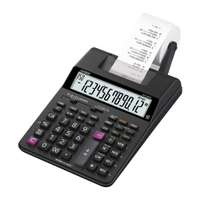
Casio 12 Digits Printing Calculator For Business Tasks - Black

Foldermate Spiral Notebook, A7, 60 Sheets, Ideal for Notes & Homework, Hi There, Assorted Colors - Box of 24
Individual Price
130.29Buy selected items separately
Bundle Price
Casio 12 Digits Printing Calculator For Business Tasks - Black
FREE Returns
Upgrade to Fepy Pro and get up to 10% off all orders.
- Casio presents the HR 100 RC Printing Calculator, designed for high-volume business and accounting calculations. The focus is on fast printing, accuracy, and reliable performance, making it perfect for office and financial use.
Key Features


- 100% free subscription
- Easy Registration
Frequently Bought Together
Everything you need in one click
Casio 12 Digits Printing Calculator For Business Tasks - Black
Foldermate Spiral Notebook, A7, 60 Sheets, Ideal for Notes & Homework, Hi There, Assorted Colors - Box of 24
Individual Price
130.29Buy selected items separately
Bundle Price
Features & Benefits
12-Digit Display
Ideal for clear viewing of large sums and business calculations.
Quick Printing
Prints calculations swiftly for easy record-keeping in business environments.
Compact and Efficient
Takes up minimal desk space while offering high functionality for businesses.
Solar Powered
Eco-friendly design with solar energy, reducing the need for frequent battery changes.
Durable Build
Built to withstand heavy usage in demanding office or business environments.
Key Specifications
Custom Stock Status
2 - 3 Days
Brands
Casio
Color
Black
Quantity Unit
PCS
Best Seller
No
Model No
HR 100 RC
Item Type
Calculator
Usage
: Office, business, and accounting
Frequently Asked Questions
What is the Casio HR-100RC Printing Calculator and what is it best used for?
The HR-100RC is a 12-digit printing calculator designed for high-volume business and accounting tasks. It prints calculations on a paper tape quickly and reliably, runs on solar power to reduce battery changes, and fits compactly on a desk. It’s ideal for office accounting, invoicing, receipts, and other daily financial tasks.
What are the key specifications of the HR-100RC?
12-digit display for clear sums; fast printing for quick record-keeping; solar powered to minimize battery replacements; compact and durable design built for busy offices; reliable performance for business calculations.
How does solar-powered operation work on this calculator, and what about low-light use?
The HR-100RC uses a built-in solar panel to power its operation and printing. In well-lit office environments it performs optimally without external batteries. In very dim light printing may be slower or less consistent, so position the calculator where it gets adequate light.
How do I load paper and replace the printing tape on the HR-100RC?
Open the printer cover, insert a fresh paper roll, thread the end of the tape through the print mechanism, and close the cover. Feed a short length of tape through the printer and press the print key to test. If the tape jams, gently remove the tape and rethread.
What basic calculations does it support and how is the result printed?
You can perform addition, subtraction, multiplication, and division in the usual way. Press the equals/total key to compute the result, and the calculator will print the calculation and result on the paper tape for your records.
What are typical use cases for this Casio model?
Ideal for small businesses and offices performing routine bookkeeping, invoicing, receipts for customers, reimbursement calculations, and any task requiring on-the-spot printed records.
How should I care for and maintain the HR-100RC?
Keep the paper path clean and free of dust. Use clean, dry hands when handling the unit. If the tape jams, remove the tape and rethread. Periodically wipe the exterior with a soft, dry cloth. Avoid liquids near the electronics.
What alternatives on Fepy.com exist for comparison, and how do they differ?
- Casio HR-120RC Printing Calculator: https://fepy.com/product/casio-hr-120rc-printing-calculator - Casio HR-150RC Printing Calculator: https://fepy.com/product/casio-hr-150rc-printing-calculator These offer similar 12‑digit printing capabilities with variations in speed, paper roll width, and build that may better suit heavier use or different desk sizes.
Why might this HR‑100RC be a good value for a busy office?
It combines a 12‑digit display, built-in fast printing, solar power to minimize battery maintenance, and a compact, durable build. For daily calculations and frequent receipts or statements, its efficiency and reliability can reduce manual errors and save time.
Are there safety or compliance considerations I should know about?
Use in a dry, well-lit environment. Keep the device away from liquids and moisture. Do not attempt repairs yourself; consult the manufacturer’s instructions if any issue arises. The device is designed with safe electronics and a low-voltage solar input.
What should I do if the printer isn’t printing or the tape doesn’t advance?
First, check that a fresh paper roll is loaded correctly and the tape is threaded through the printer. Ensure there’s no jam and that the cover is fully closed. If issues persist, power cycle the unit by turning it off and back on (if applicable) or replace the paper tape.
How do I reset figures or clear a mistaken calculation on the HR-100RC?
Use the clear or AC/Reset function to clear the current entry or the entire memory as needed, then re-enter the numbers and print again. If the calculator has a dedicated reset button, press it as described in the user manual.
Frequently Asked Questions
The HR-100RC is a 12-digit printing calculator designed for high-volume business and accounting tasks. It prints calculations on a paper tape quickly and reliably, runs on solar power to reduce battery changes, and fits compactly on a desk. It’s ideal for office accounting, invoicing, receipts, and other daily financial tasks.
12-digit display for clear sums; fast printing for quick record-keeping; solar powered to minimize battery replacements; compact and durable design built for busy offices; reliable performance for business calculations.
The HR-100RC uses a built-in solar panel to power its operation and printing. In well-lit office environments it performs optimally without external batteries. In very dim light printing may be slower or less consistent, so position the calculator where it gets adequate light.
Open the printer cover, insert a fresh paper roll, thread the end of the tape through the print mechanism, and close the cover. Feed a short length of tape through the printer and press the print key to test. If the tape jams, gently remove the tape and rethread.
You can perform addition, subtraction, multiplication, and division in the usual way. Press the equals/total key to compute the result, and the calculator will print the calculation and result on the paper tape for your records.
Ideal for small businesses and offices performing routine bookkeeping, invoicing, receipts for customers, reimbursement calculations, and any task requiring on-the-spot printed records.
Keep the paper path clean and free of dust. Use clean, dry hands when handling the unit. If the tape jams, remove the tape and rethread. Periodically wipe the exterior with a soft, dry cloth. Avoid liquids near the electronics.
- Casio HR-120RC Printing Calculator: https://fepy.com/product/casio-hr-120rc-printing-calculator - Casio HR-150RC Printing Calculator: https://fepy.com/product/casio-hr-150rc-printing-calculator These offer similar 12‑digit printing capabilities with variations in speed, paper roll width, and build that may better suit heavier use or different desk sizes.
It combines a 12‑digit display, built-in fast printing, solar power to minimize battery maintenance, and a compact, durable build. For daily calculations and frequent receipts or statements, its efficiency and reliability can reduce manual errors and save time.
Use in a dry, well-lit environment. Keep the device away from liquids and moisture. Do not attempt repairs yourself; consult the manufacturer’s instructions if any issue arises. The device is designed with safe electronics and a low-voltage solar input.
First, check that a fresh paper roll is loaded correctly and the tape is threaded through the printer. Ensure there’s no jam and that the cover is fully closed. If issues persist, power cycle the unit by turning it off and back on (if applicable) or replace the paper tape.
Use the clear or AC/Reset function to clear the current entry or the entire memory as needed, then re-enter the numbers and print again. If the calculator has a dedicated reset button, press it as described in the user manual.
Ratings & Reviews
See what customers are saying
No reviews yet
Be the first to review this product after purchase.
No reviews yet. Reviews appear here once customers review their orders.
No reviews yet
Be the first to review this product after purchase.
No reviews yet. Reviews appear here once customers review their orders.
Similar Products
More from Casio
Bestsellers from Office Supplies
Why Buy From Fepy
We provide the best shopping experience
Manufacturer Warranty
Official warranty coverage from brand manufacturers
99% Claims resolved
Cash on Delivery
Choose Cash or Card as your payment
AED 100+ Min. order value
Secure Payment
100% secure payment processing
256-bit SSL encryption
Free Delivery
On all orders above AED 200 across UAE
Same Day In Abu Dhabi & Dubai
100% Genuine
Authentic products guaranteed
Authorized Distributor
Free Returns
7-day easy return policy
No questions Asked policy
Years Experience
UAE Stores
Happy Customers
Products
Trusted by Leading Brands
We are authorized distributors for top global brands
Manufacturer Warranty
Official warranty coverage from brand manufacturers
99% Claims resolved
Cash on Delivery
Choose Cash or Card as your payment
AED 100+ Min. order value
Secure Payment
100% secure payment processing
256-bit SSL encryption
Free Delivery
On all orders above AED 200 across UAE
Same Day In Abu Dhabi & Dubai
100% Genuine
Authentic products guaranteed
Authorized Distributor
Free Returns
7-day easy return policy
No questions Asked policy